


Duplicating repetitive BASIC lines

If I’m reading Peter Stumpf’s code right, this image was just a series of LINEs in the Color Computer’s Extended BASIC.
I wrote last time about some of the command-line utilities I use on macOS to help type code from books and magazines. I have two other very simple utilities I use that I’ve never written about because they’re so simple. Both have to do with repetitive code.
The lack of real custom functions in Color Computer BASIC makes a lot of its code very repetitive. Often, long sections of a BASIC listing will be the same line with slightly different numbers over several lines or even columns. I wrote basicDuplicator to literally just duplicate the selected line, updating only the line number.
[toggle code]
- #!/usr/bin/perl
- # duplicate a line of BASIC with increments
- # Jerry Stratton astoundingscripts.com
-
while ($option = shift @ARGV) {
-
if (!$count && $option =~ /^[1-9][0-9]*$/) {
- $count = $option;
-
} elsif (!$increment && $option =~ /^[1-9][0-9]*$/) {
- $increment = $option;
-
} elsif (!$lineText && $option =~ /^([1-9][0-9]*) (.+)$/) {
- $lineNumber = $1;
- $lineText = $2;
-
} else {
- help("Unknown option $option");
- }
-
if (!$count && $option =~ /^[1-9][0-9]*$/) {
- }
- help("Duplication count must be one or more") if !$count;
- help("BASIC line with initial line number must be provided") if !$lineText;
- $increment = 10 if !$increment;
- $currentLine = $lineNumber;
-
while ($currentLine <= $lineNumber + $count*$increment) {
- print "$currentLine $lineText\n";
- $currentLine += $increment;
- }
-
sub help {
- my $message = shift;
- print "$0 <count> [increment] <line>\n";
- print "Reprint initial line, and then duplicate LINE, COUNT times, incrementing the line number by 10 or given increment\n";
- print "\n";
- print "$message\n";
- exit();
- }
Suppose, for example, that I’m faced with the following three lines:
- 50 M1=240:M2=RND(70)+60:GOTO16
- 51 M3=240:M4=RND(70)+60:GOTO16
- 52 M5=240:M6=RND(70)+60:GOTO16
I would type in the first line, line 50. Then, I would highlight that line with the mouse, copy it, and paste it into the Terminal as an argument to basicDuplicator:
- basicDuplicator 2 1 '50 M1=240:M2=RND(70)+60:GOTO16'
And I’d get back:
- 50 M1=240:M2=RND(70)+60:GOTO16
- 51 M1=240:M2=RND(70)+60:GOTO16
- 52 M1=240:M2=RND(70)+60:GOTO16
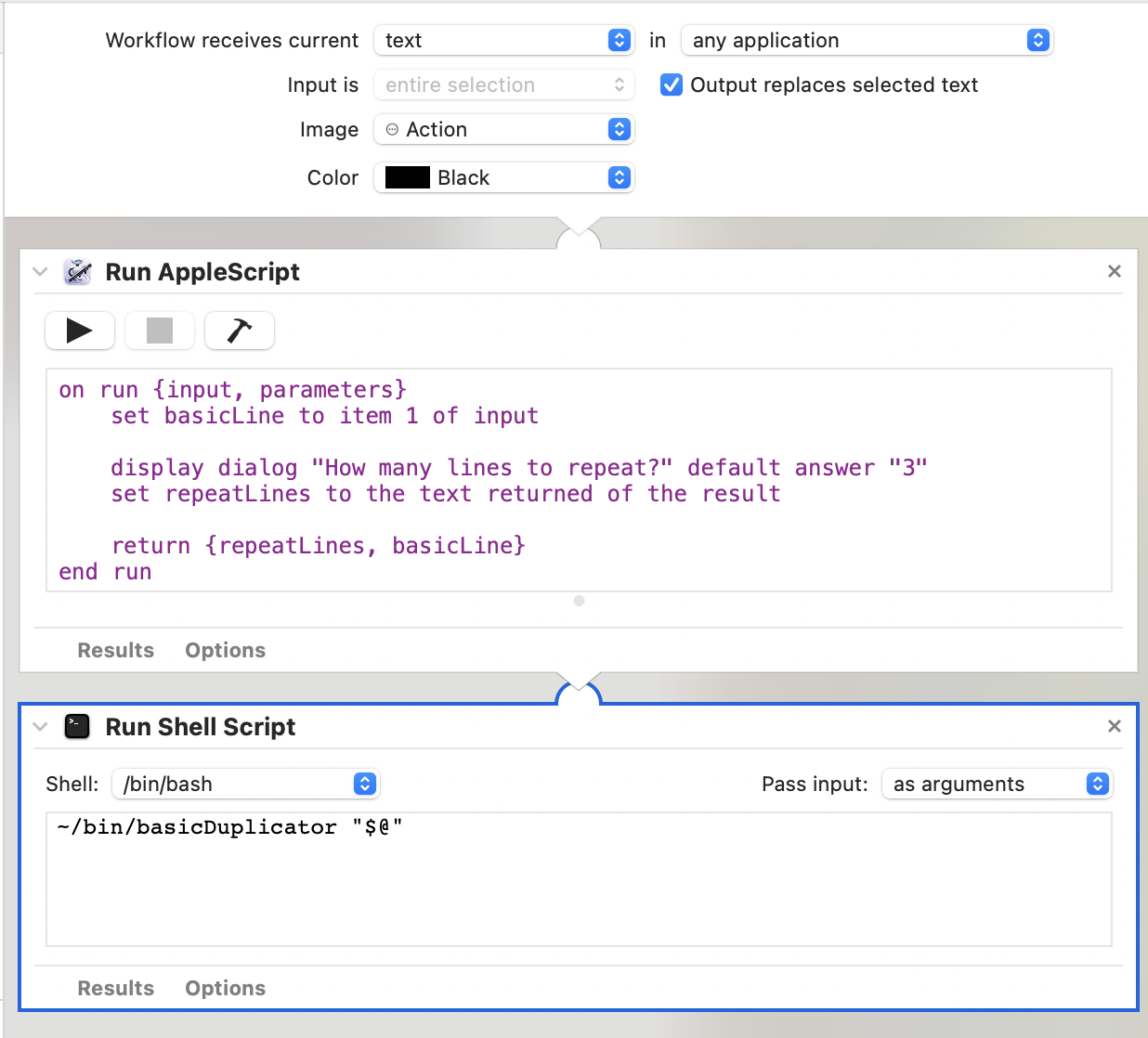
Two actions in an Automator workflow to duplicate a line of BASIC any number of times.
Whereupon I would only have to change the six variable names to get the correct code.
The 2 argument is how many copies I want, and the 1 argument is the increment between lines.
Obviously, the more lines that need to be copied, the more useful this script is.
And also obviously, it would be easier to use this script if I could just right-click a line and get the copies I want. So I have an Automator workflow that consists of two actions. The first is a Run AppleScript action that consists of:
[toggle code]
-
on run {input, parameters}
- set basicLine to item 1 of input
- display dialog "How many lines to repeat?" default answer "3"
- set repeatLines to the text returned of the result
- return {repeatLines, basicLine}
- end run
The second is a Run Shell Script action that consists of the single line:
- ~/bin/basicDuplicator "$@"
The Run Shell Script action is set to pass the input as arguments. See the screenshot for all of the workflow’s settings (PNG, 180.6 KB).
Because many of the duplicative lines in Color Computer BASIC were about drawing lines from point to point, I also wrote cocoLINE. It takes a series of x,y points and creates a series of lines of the form LINE(x1,y1)-(x2,y2),PSET to connect those points.
[toggle code]
- #!/usr/bin/perl
- #Make connecting LINE statements for CoCo BASIC
- #cocoLINE xxxx filename
- #provide file with xx,yy, one point per line
- #example: cocoLINE 1660 fourthLines.txt | fold -w 32 | pbcopy
- #created for Rainbow July 1984 "A Fourth of July Celebration"
- # Jerry Stratton, hoboes.com/coco
- $startingLine = shift;
- help() if $startingLine eq '--help';
- $increment = shift if $ARGV[0] =~ m/^[1-9][0-9]*/;
- $increment = 10 if !$increment;
- $line = $startingLine;
-
while (<>) {
- chomp;
- $nextPoint = $_;
-
if ($startingPoint) {
- print "$line LINE($startingPoint)-($nextPoint),PSET\n";
- $line += $increment;
- }
- $startingPoint = $nextPoint;
- }
-
sub help {
- print "$0 <line> [increment] <file>\n";
- print "Convert a line of number pairs to CoCo BASIC’s LINE statements.\n";
- print "line:\tThe first line number.\n";
- print "file:\tA file with one pair of numbers per line, of the form xx,yy.\n";
- print "\t96,184\n\t98,187\n\t101,189\n";
- print "\n\tbecomes:\n\n";
- print "\tLINE(96,184)-(98,187),PSET\n";
- print "\tLINE(98,187)-(101,189),PSET\n";
- print "--help:\tDisplay this help file.\n";
- exit;
- }
As you can see from the comments, I initially wrote this for Peter Stumpf’s Fourth of July program in Rainbow Magazine’s July, 1984 issue. For a simpler example, suppose I were typing in a program to draw a square, like this:
- 10 PCLEAR 1
- 20 PCLS
- 30 SCREEN 1,1
- 100 LINE(5,5)-(5,100),PSET
- 110 LINE(5,100)-(100,100),PSET
- 120 LINE(100,100)-(100,5),PSET
- 130 LINE(100,5)-(5,5),PSET
- 999 GOTO 999
I would type in lines 10, 20, 30, and 999. But for lines 100 to 130 I would type the points in a separate file:
5,5
5,100
100,100
100,5
5,5
Then, cocoLINE 100 points.txt | pbcopy would convert those points into a series of LINE(…) commands and store them in the clipboard. I would then paste them into the BASIC program.
The 100 argument is the line number to start the BASIC code from. You can also add a second argument which will be the increment for subsequent line numbers; the increment defaults to 10.
I don’t use these scripts as often as I use the other ones, but when I do they drastically cut down on the typos that easily creep into a page full of similar code.
Because they’re both so short, I will occasionally edit these scripts just before using them, to make them output the exact code I need. For example, if I were using this script to generate new code rather than type code from a magazine, I might change the format. The example BASIC lines could be made slightly less readable but faster and use less memory by removing the starting point from the second line onward:
- 10 PCLEAR 1
- 20 PCLS
- 30 SCREEN 1,1
- 100 LINE(5,5)-(5,100),PSET
- 110 LINE-(100,100),PSET
- 120 LINE-(100,5),PSET
- 130 LINE-(5,5),PSET
- 999 GOTO 999
The Color Computer’s BASIC remembers where the last LINE left off. Removing the first set of parenthesized numbers reduces the amount of parsing the Color Computer has to do to draw that line.
In response to TRS-80 Color Computer Programming Tools: The TRS-80 Color Computer was a fascinating implementation of the 6809 computer chip, and was, from the Color Computer 1 through 3, possibly the longest-running of the old-school personal computers.
- 8 bit Fourth of July at Mimsy@YouTube
- “A sample run through Peter Stumpf’s “A Fourth of July Celebration” from the July, 1984, issue of Rainbow Magazine.”
- The Rainbow Magazine July 1984 at Internet Archive
- The Third Anniversary issue, with a scratch-and-sniff adventure and a comprehensive three-year index.
- Thoughts on typing 8-bit code
- Using a modern computer to type retro code from old books and magazines opens up several possibilities for preflighting the code. This is a summary of what I do, along with two utilities to help when typing duplicative code.
More BASIC
- Thoughts on typing 8-bit code
- Using a modern computer to type retro code from old books and magazines opens up several possibilities for preflighting the code. This is a summary of what I do, along with two utilities to help when typing duplicative code.
- Simple game menu for the Color Computer 2 with CoCoSDC
- This simple menu provides one screen for cartridges saved in the CoCoSDC’s flash ROM, and any number of screens for your favorite games for your friends to play.
- BASIC tokenization examined
- Why do old BASIC programs have strange characters in their .BAS files? Why do they look like they’re compiled code?
- Read BASIC out loud
- Reading BASIC out loud is a great tool for verifying that what you’ve typed in from an old-school magazine or book is correct.
- Convert PCBASIC code to TRS-80 Extended Color BASIC
- If you have a book of code written in PCBASIC, it usually isn’t hard to convert it to other Microsoft BASICs, such as on the TRS-80 Color Computers.
- Eight more pages with the topic BASIC, and other related pages
More Color Computer
- Thoughts on typing 8-bit code
- Using a modern computer to type retro code from old books and magazines opens up several possibilities for preflighting the code. This is a summary of what I do, along with two utilities to help when typing duplicative code.
- Simple game menu for the Color Computer 2 with CoCoSDC
- This simple menu provides one screen for cartridges saved in the CoCoSDC’s flash ROM, and any number of screens for your favorite games for your friends to play.
- Rainbow Magazine preflight tool enhanced
- I’ve added several features to the Rainbow Magazine preflight tool, including a check for references to line numbers that don’t exist.
- CoCoFest! 2021
- Forty years later, I finally make it to CoCoFest!
- BASIC tokenization examined
- Why do old BASIC programs have strange characters in their .BAS files? Why do they look like they’re compiled code?
- 21 more pages with the topic Color Computer, and other related pages